Object containers
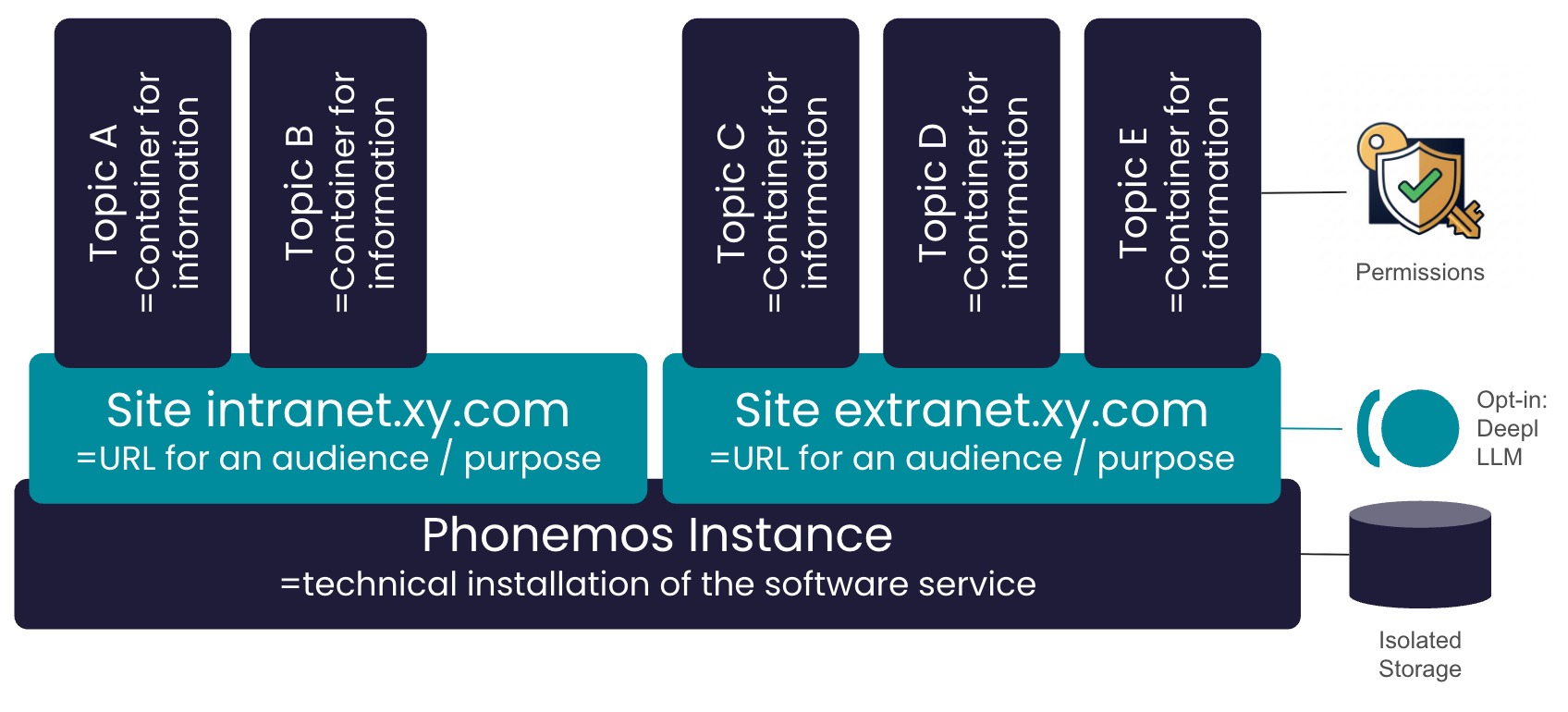
The following graphics shows a high-level conceptual structure of Phonemos.
Term | Description |
|---|---|
Phonemos Instance | We call a technical installation of Phonemos an instance with its dedicated storage/database. .An instance may be a single server setup or a high availability setup across multiple cluster nodes. Users, groups and user licenses are managed on the Phonemos instance level for multiple sites. |
Phonemos Site | Phonemos can host one or multiple sites, each reachable through its own URL. Typically, you will create a site for a certain audience or purpose, e.g. a supplier portal, an intranet, a project collaboration site etc. Every site has a landing page. To login to a Phonemos site, users need to have site access permissions for this site. Some features of Phonemos require communication with external services, thus causing data to be transferred selectively. Examples are DeepL for translations or a Large Language Model for embeddings or an LLM accessing Phonemos' MCP Server. These external interfaces and data transfers can be enabled or disabled per site. Thus, you can have a collaboration site where you profit from these feature and have them enabled, but if you have confidential proprietary information that you absolutely do not want to have transferred, you may disable this for a site. |
Phonemos Topic | The actual content you want to work with is structured into topics. Think of the topic as being the container where your information lives. A topic may represent a team, a process, a project or a product - you are free to customize this to your needs. Many things, but especially permissions, are managed per topic. |
Phonemos Zones | Not shown in the graphics, but similar to a topic: in the Business subscription, you can further subdivide topics into a hierarchy of zones to define finer grained permissions. |
Phonemos Portals | Not shown in the graphics, but similar to.a site: as a paid option, you can add additional portals to your instance to publish topics to a read-only audience. |
Objects
Objects are what you put and update within topics. Objects always have a certain object type. Objects can be nested into a tree structure. Objects can be of several types.
Object type | Description |
|---|---|
Page | A page is a rich text wiki page. Pages are multi-lingual. They are created in the containers default language and may be translated later to other languages if enabled on the container. See also: |
Zones | Zones allow finegrained permission management. Zones are sections each with specific group access rights. When moving pages from one zone to the other, access rights change accordingly. Zones have similar properties like a topic, but live inside a topic. |
Template folder | Template folder contain templates for an object tree that you can clone and reuse. |
File stack | A file stack is in its essence a folder for files you can up- and download. Files with the same name are automatically versioned. |
Record set | A record set is basically a single table with structured and typed data. |
External link | You can add external web-links in your content tree or menu bar. |
Announcement channel | A channel to publish news and announcements. |
Connectors | You can add connectors to your system to integrate information from other systems. |