coming soon
This is a preview / sneak peek of an upcoming feature. All information shown is yet subject to change.
In many situations, simple task management that are most often tracked from meeting note to meeting note are a perfectly fine way of process and project management (see Simple task management). When these tasks are more complex and get processed over a series of steps, you might prefer to switch to a Kanban-style of task tracking.
What is Kanban?
Kanban is a visual system for managing work as it moves through a process. At its simplest, it’s a way to see what you are doing, what you’ve finished, and what’s coming up next.
Originally developed by Taiichi Ohno for Toyota in the 1940s, it was inspired by how supermarkets stock their shelves: they only replenish an item when it's almost sold out. This "pull" system was adapted to manufacturing and later revolutionized software development and general project management.
To implement Kanban, you need:
The Kanban Board: A visual space (physical or digital) representing your workflow.
The Columns: Each column represents a stage in your process (e.g., To Do, In Progress, Testing, Done).
The Cards: Each card represents a specific task. As work progresses, the card physically moves from left to right across the columns.
Unlike many other methodologies, Kanban is "evolutionary," not revolutionary. It doesn't ask you to change your job title or throw away your current process.
Start with what you do now: Apply Kanban to your current workflow without immediate radical changes.
Agree to pursue incremental change: Focus on small, continuous improvements rather than one giant overhaul.
Respect current roles & responsibilities: You don’t need to hire a "Kanban Master"; keep your existing team structure.
Encourage leadership at all levels: Anyone—from an intern to a CEO—can suggest an improvement to the workflow.
The ultimate goal of Kanban is to maximise the throughput of a continuous flow of work. Throughput is hindered by bottlenecks that can be caused by many different reasons. Kanban cannot directly resolve the reasons for bottlenecks, but it can make them visible. You usually do this by limiting the work in progress (WIP). For example if you have a team of three people performing work in one column of your Kanban board, you ideally want to limit the number of items in that column to 3. But in reality, urgent events might cause repriorizations, dependencies block further progress etc. and more items will need to be started than already in progress. This causes inefficiencies from task switching and results in a lower throughput in the system. Kanban makes these process issues visible and give you indicators that allow you to find the root causes that disrupt your optimal continuous flow. The saying in Kanban is “stop starting and start finishing.”
While Kanban is in itself part of this method to optimize continuous flow that can be applied in every process, Kanban boards are also very useful in other settings where you want to visualise work, e.g. in project management with Scrum or requirement management with User Story Mapping.
Adding a Kanban board
The detailed mechanisms to add a Kanban board are under development.
Once you added the board, it will display. the Phonemos objects you filtered for as cards.
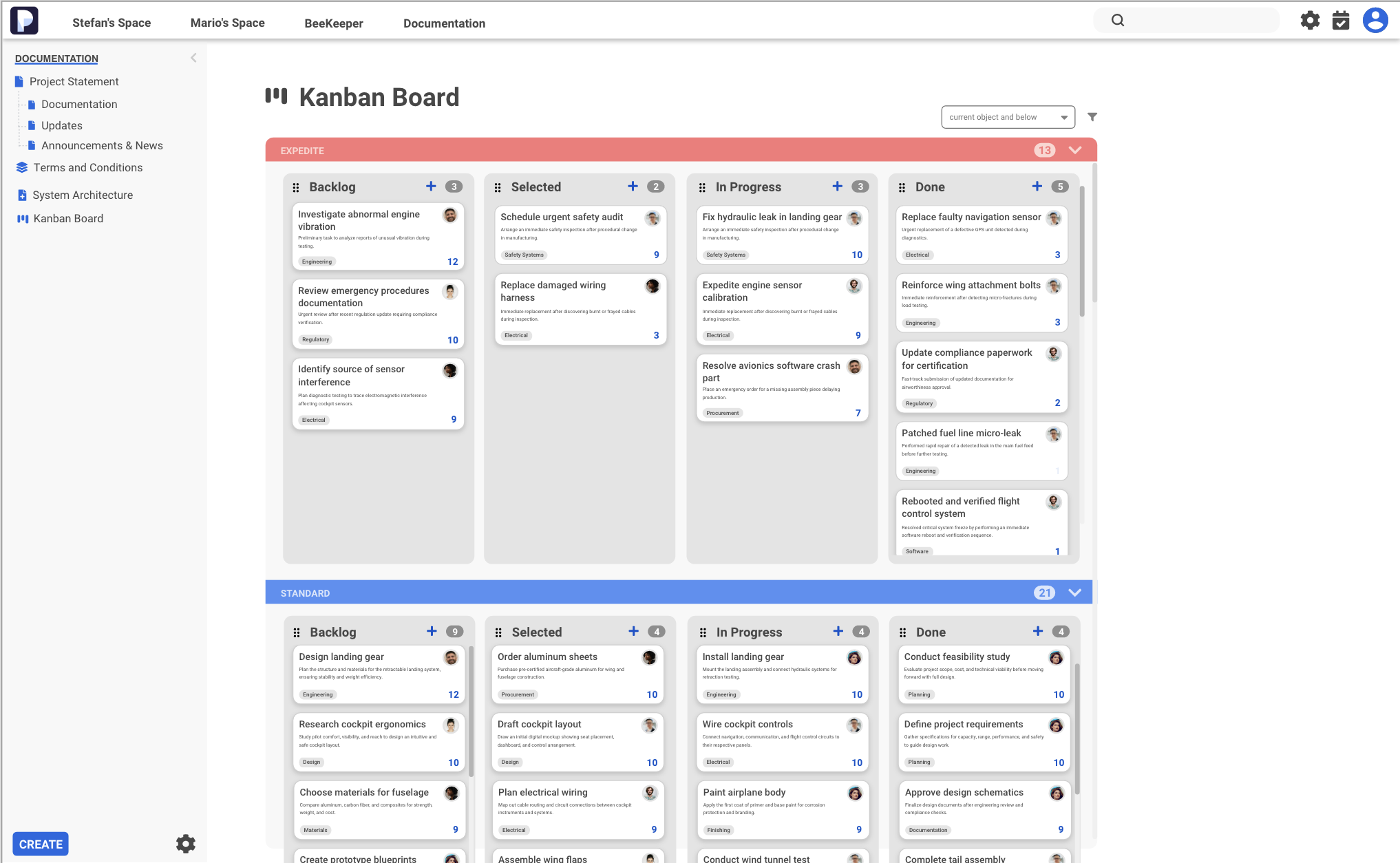
Note that you can add horizontal swimlanes to differentiate between service classes or other criteria.